Онлайн-покупки в США – это не только удобно, но и действительно выгодно. Одежду, обувь и технику в американских магазинах часто можно купить по ценам заметно ниже, чем в России и других странах СНГ, особенно во время распродаж.
Тем, кто только начинает разбираться в зарубежном шопинге, процесс может показаться сложным или даже пугающим. На практике все гораздо проще: заказывать товары из магазинов США с доставкой в Россию, Беларусь и другие страны не сложнее, чем делать покупки в привычных онлайн-магазинах.
Эта статья для тех, кто еще ни разу не покупал в американских интернет-магазинах, но давно хотел попробовать. Мы покажем, что шопинг в США – это просто, понятно и действительно выгодно.
Шаг 1. Как все работает?
Для того чтобы совершить покупки в США, а получать их в вашей стране, прежде всего, необходимо выбрать компанию-посредника.
Мэйлфорвардинг (или «ваш адрес за рубежом», посредник) – услуга, при которой вы самостоятельно совершаете покупки и используете адреса складов компании-посредника за рубежом.
Prostobox.com является мейлфорвардером, который предоставляет каждому клиенту бесплатный персональный адрес в США для приема, хранения и дальнейшей отправки ваших покупок.
Все просто: достаточно пройти быструю регистрацию у нас на сайте, заполнить профиль и получить ваш персональный адрес в США!
А также у нас есть услуга “Покупка с байером”, наши профессиональные сотрудники могут выкупить товар за вас, если у вас нет зарубежной карты.
Самое время приступать к оформлению первых покупок в магазинах США!
Шаг 2. Что надо для оформления заказов в магазинах США?
Прежде всего, для того чтобы делать покупки в США самостоятельно, необходимо иметь личную платежную карту для оплаты покупок. Американские магазины принимают карты Visa или Mastercard. Но важно, чтобы ваша была выпущена не санкционным банком. Если у вас есть активный зарубежный аккаунт PayPal, вы можете использовать его для оплаты. Обратите внимание: российские аккаунты PayPal в настоящее время не работают, поэтому необходимо использовать PayPal, зарегистрированный в другой стране.
Для покупки товаров в американских интернет-магазинах мы рекомендуем открыть долларовую карту в иностранном банке – в этом случае вы делаете оплату сразу в долларах и не теряете ничего на конвертации. Хотя, разумеется, вы можете делать покупки и картой в валюте вашей страны и пополнить баланс в личном кабинете тенге или белорусскими рублями (актуально для Казахстана и Беларуси). Главное, чтобы у карты была открыта возможность совершения покупок в интернете (можно уточнить у вашего банка).
Для покупки с оператором достаточно будет карты российского банка, которой вы можете пополнить баланс вашего личного кабинета. Также вы можете пополнить ваш баланс криптовалютой.
Шаг 3. Как и где покупать?
В США огромное количество магазинов, где можно найти буквально все, что угодно. На нашем сайте вы найдете список популярных вариантов для начала, но вы не ограничены – можно заказывать из любого магазина по вашему выбору.
Процесс оформления заказа в американских интернет-магазинах, как правило, выглядит так:
-
регистрация (почтовый ящик и пароль)
-
ввод адреса доставки (указанного вами адреса нашего склада)
-
добавление платежной информации (данные вашей карты)
-
выбор товаров и оплата
-
ожидание отправки заказа на склад
Обычно магазин отправляет посылку на наш склад в течение нескольких дней. Подробные пошаговые инструкции по оформлению заказов в конкретных магазинах вы можете найти здесь. В целом, процесс одинаков практически во всех американских интернет-магазинах.
В конце статьи мы рассмотрим примеры того, как сделать заказ в Amazon и Macy’s.
Шаг 4. Заказ в магазине оформлен, что же дальше?
По сути, самое сложное и страшное уже позади. Теперь осталось только дождаться когда магазин (продавец) отправит заказ и предоставит трекинг-номер для отслеживания посылки по США.
Где можно отслеживать треки (посылки по США)?
99% всех покупок, оформленных в магазинах США, отправляются тремя крупнейшими в Америке службами доставки:
-
USPS — государственная почтовая служба США (United States Postal Service);
-
UPS — американская коммерческая компания (United Parcel Service);
-
Fedex — еще одна коммерческая служба доставки (Federal Express).
Если же магазин отправил ваш заказ какой-то другой службой, то вы всегда сможете отследить заказ в аккаунте магазина.
После того как магазин (продавец) предоставил трекинг номер, необходимо внести его в ожидаемые посылки у нас. Как только посылка будет принята складом, она появится у вас в личном кабинете (об этом придет SMS уведомление или письмо на вашу почту).
Шаг 5. Посылка на складе, что теперь?
Здесь есть два варианта.
-
Сразу после получения первого заказа на склад сформировать посылку к отправке;
-
Дождаться других ваших покупок и объединить их все вместе в одну посылку (консолидировать).
Консолидация – это объединение нескольких посылок (заказов) в одну общую посылку.
Второй вариант можно назвать более выгодным, так как чем больше будет вес вашей посылки, тем выгоднее условия доставки. Здесь нужно учитывать, что у всех служб доставки без исключения самый дорогой по стоимости всегда первый килограмм, а каждый последующий уже существенно дешевле.
Первый же способ (отправка сразу) мы рекомендуем в том случае, если вы больше ничего не планировали покупать в ближайшее время и объединять несколько заказов в одну посылку вам не требуется.
Шаг 6. Посылку надо отправить, но как?
Прежде всего необходимо выбрать службу доставки. Предварительно рассчитать стоимость доставки и определиться со службой доставки можно в нашем калькуляторе доставки. Подробно прочитать о каждой службе доставки, ограничениях по максимальному весу и так далее можно в разделе вопросов и ответов.
Определившись со службой доставки, можно приступать к оформлению посылки и ее отправки на сборку.
Когда посылки поступили на склад (все, которые вы хотите сейчас отправить) и появились на вкладке Покупки на складе, вам нужно отметить посылки и добавить их в формируемую посылку (кнопка «Добавить в посылку»).
Шаг 7. Заключительный и самый приятный
После того, как посылка будет отправлена со склада, рядом с ней появится международный трекинг номер, по которому можно отслеживать движение посылки. После того, как посылка будет доступна к получению вы получите оповещение (уведомление с почты в вашем почтовом ящике или смс сообщение о выдаче посылки курьеру, например). Для получения посылки при себе необходимо иметь документы, удостоверяющие личность (паспорт).
Мы рекомендуем проверять содержимое посылки и целостность товаров при операторах почты либо сотрудниках службы доставки. После проверки посылки, забираете посылку домой и радуетесь вашим новым покупкам!
Как видно из этой статьи, покупать в США с доставкой в Россию, Беларусь (и другие страны) действительно просто и легко. Если же какие-то моменты остались для вас непонятны, вы всегда можете задать интересующие вопросы в тикетах в вашем личном кабинете либо оператору в онлайн чате.
А теперь рассмотрим подробнее как сделать заказ на Amazon
Как зарегистрироваться на Amazon
1. Открываем в браузере сайт Amazon
2. В правом верхнем углу страницы наведите на «Hello. Sign In Account&Lists». В появившемся меню кликните на ссылке «Sign here»
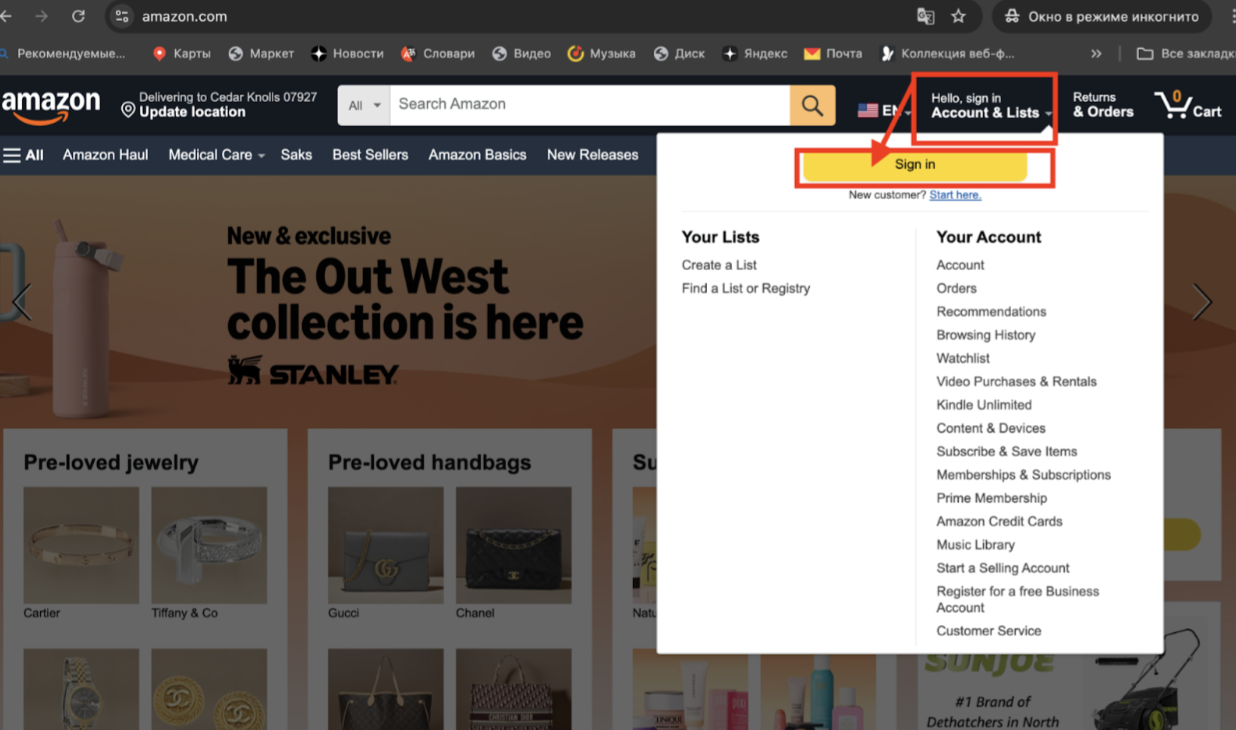
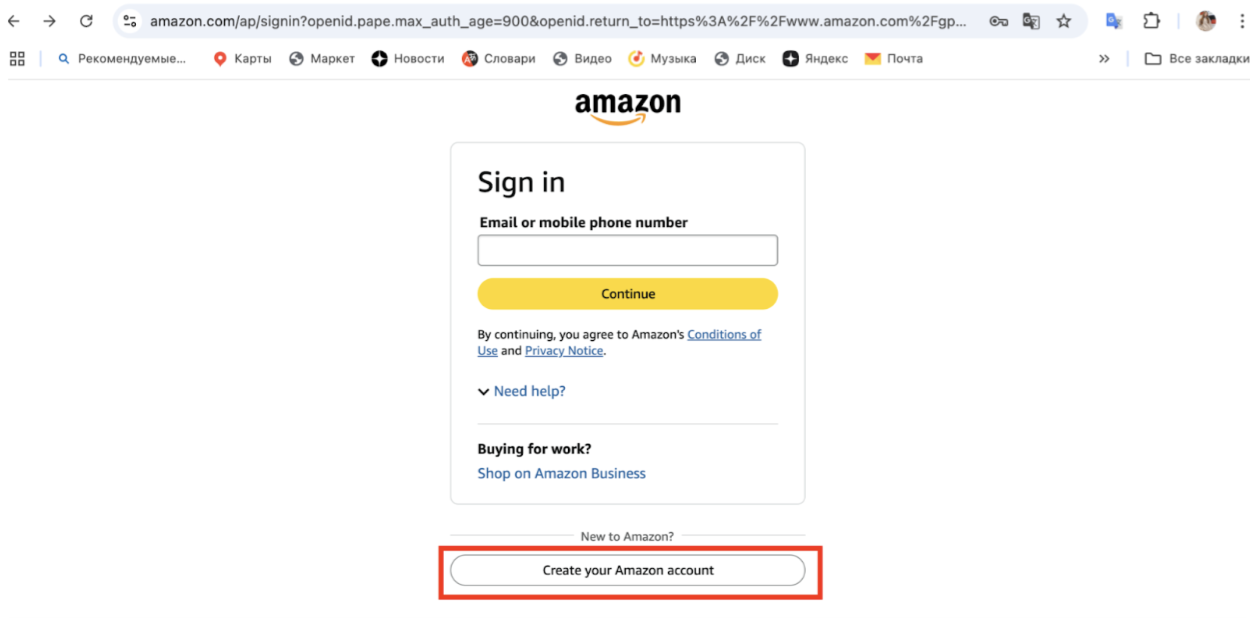
3. После этого в открывшемся окне вам нужно пройти регистрацию.
Нажмите на кнопку “Create your Amazon account”
4. Далее вам нужно ввести ваши данные
Введите имя, фамилию на латинице. Рекомендуем вводить не номер телефона, так как российские номера могут быть заблокированы для отправки уведомлений, а именно почтовый ящик (также лучше выбирать не российские домены mail и яндекс, а, например, международный gmail). Также нужно придумать пароль и повторить его.
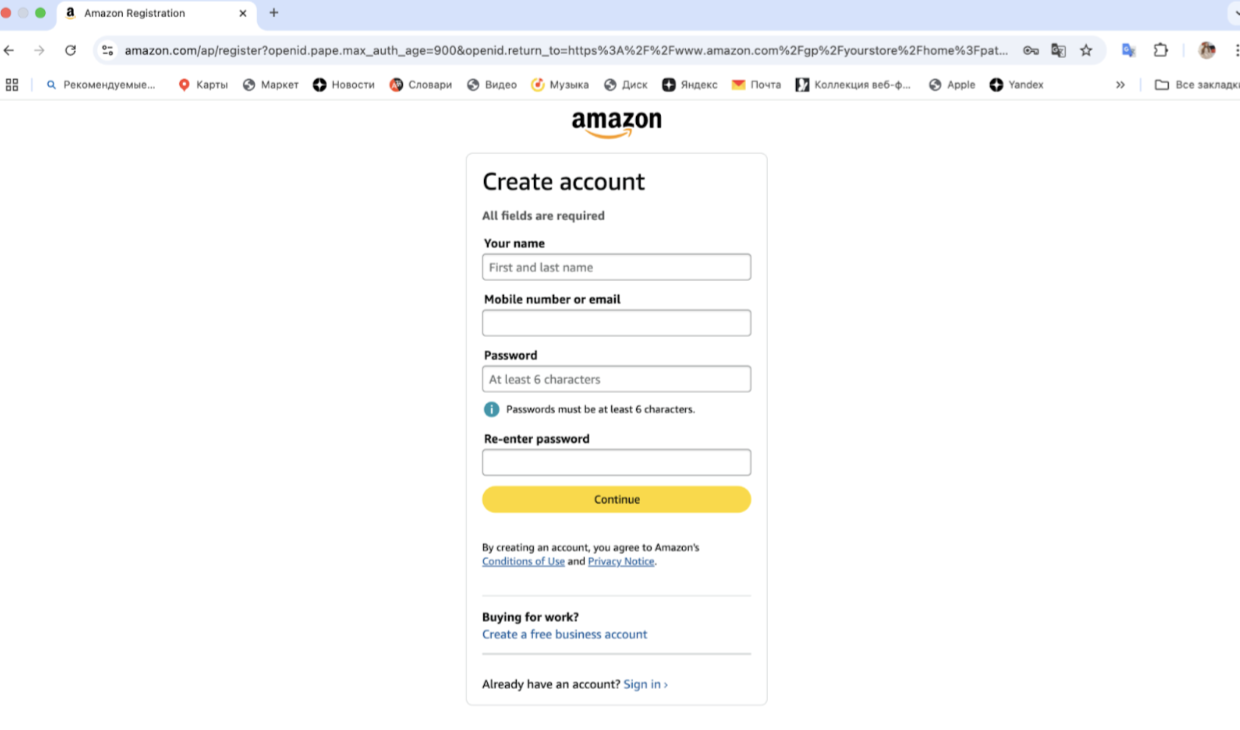
Нажмите на кнопку Continue
5. После этого необходимо пройти верификацию вашего почтового ящика
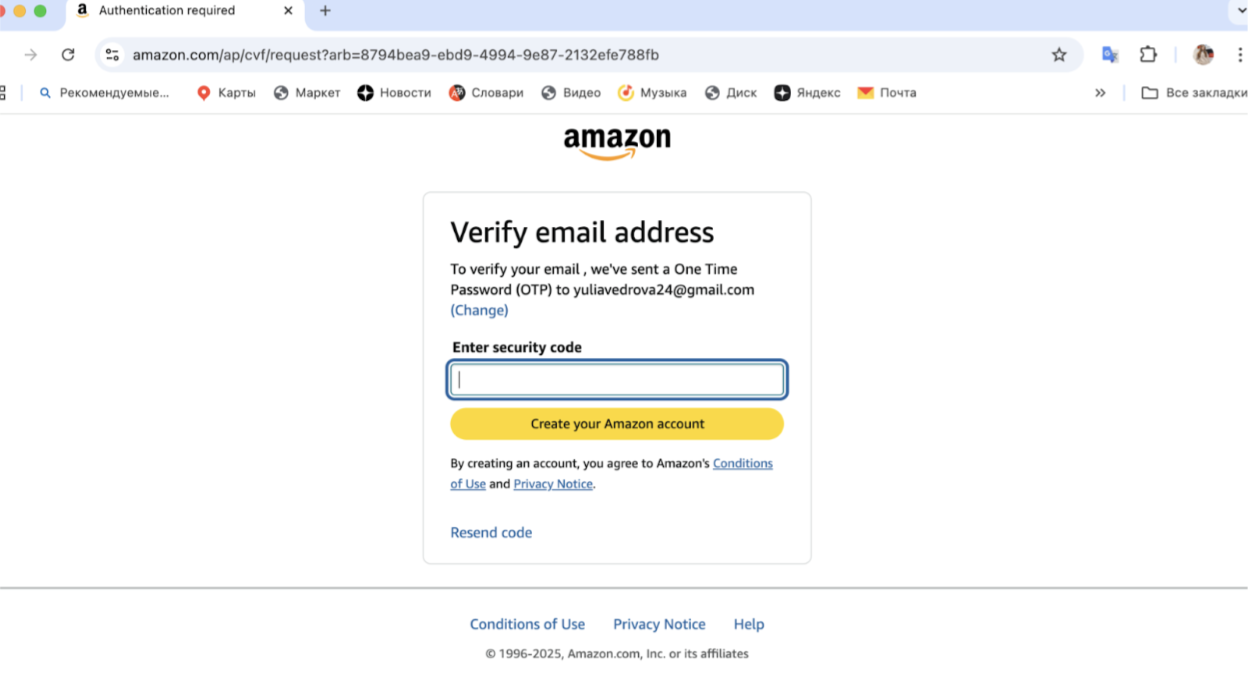
Проверьте почту и введите OTP код в пустое поле.
Когда код будет подтвержден, вы получите доступ к покупкам! Теперь вы полноправный зарегистрированный покупатель Amazon. Поздравляем!
Поиск товаров на Amazon и их покупка
1. Поиск товара можно осуществлять как по разделам (books, electronics), так и по названию или бренду - для этого достаточно воспользоваться строкой Search.
В качестве примера рассмотрим приобретение отличного подарка и самой модной кружки Stanley.
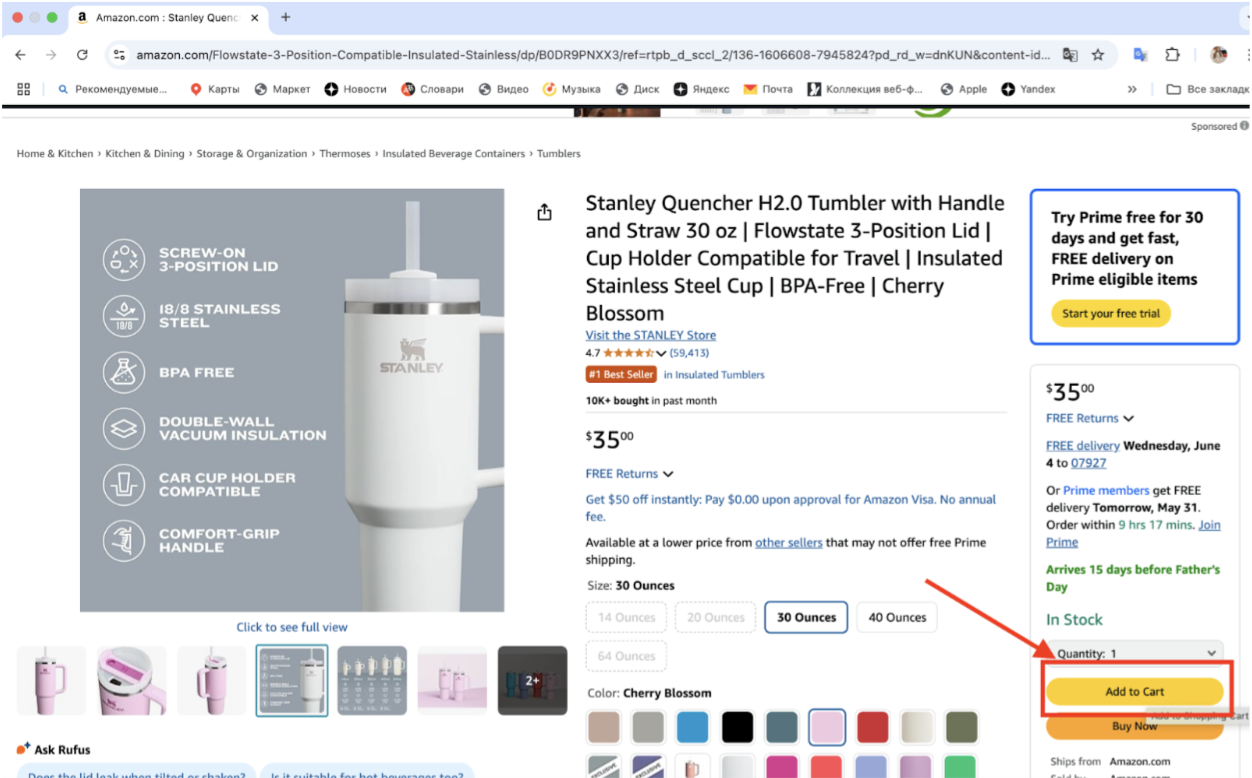
В правой части страницы товара есть заметная желтая кнопка «Add to cart», нажав на которую понравившийся вам товар моментально добавляется в корзину.
Итак, смело жмем кнопку и переходим к обзору того, что мы собираемся купить.
2. Далее проверяем сумму покупки, цвет и нажимаем на кнопку “Proceed to checkout (1 item)”

3. Теперь приступаем к оформлению адреса доставки. Нажимаем на кнопку “Add a new delivery address”
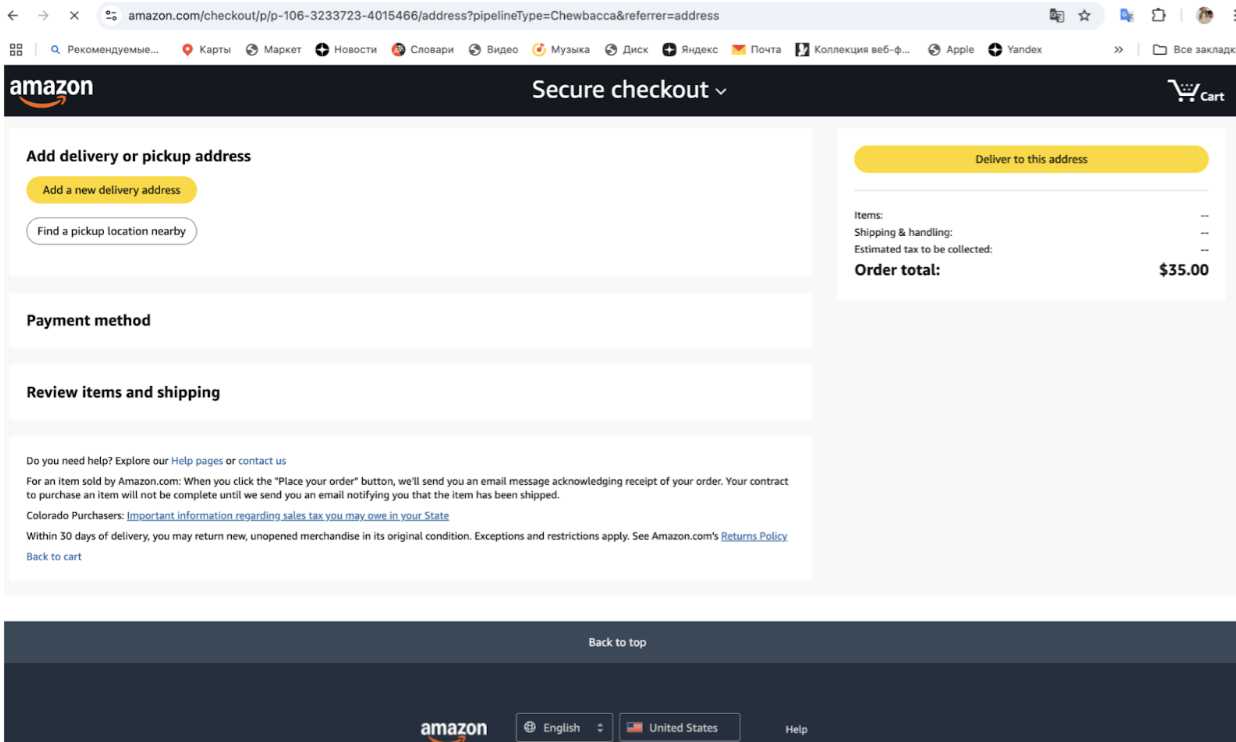
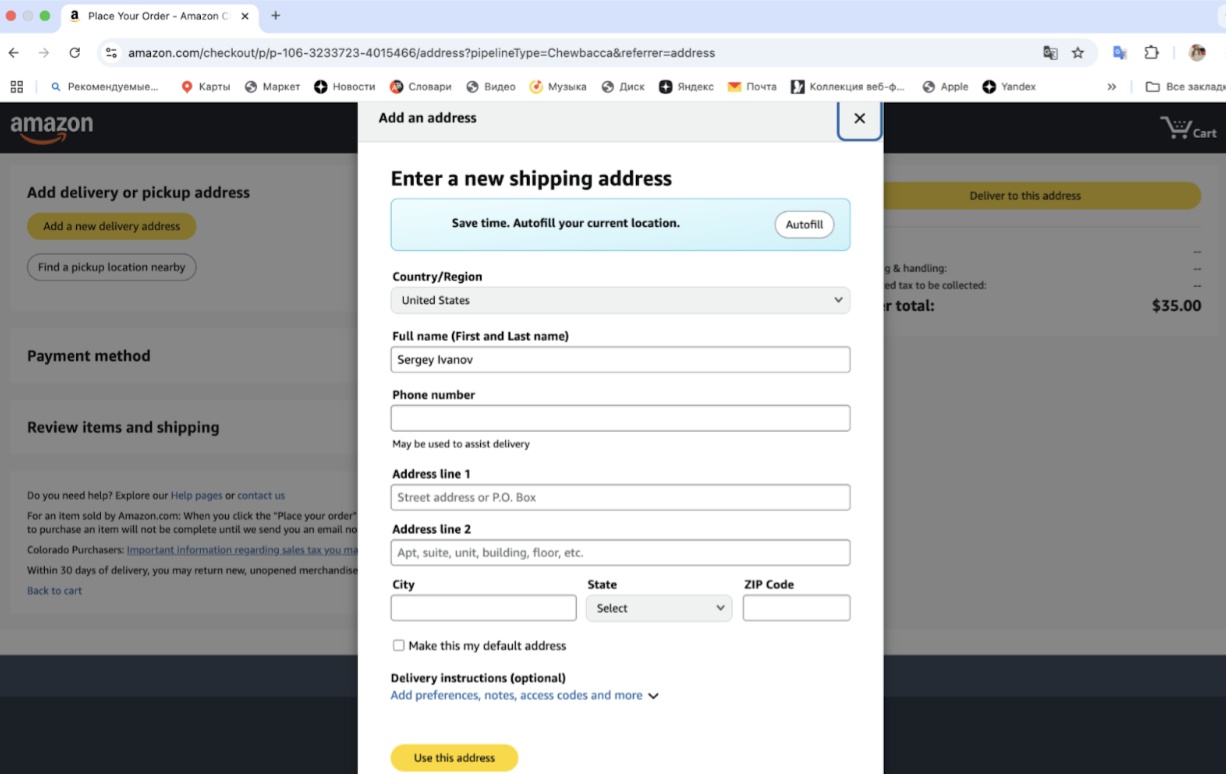
4. В открывшемся окне нужно ввести адрес склада в вашем личном кабинете в нашем сервисе.
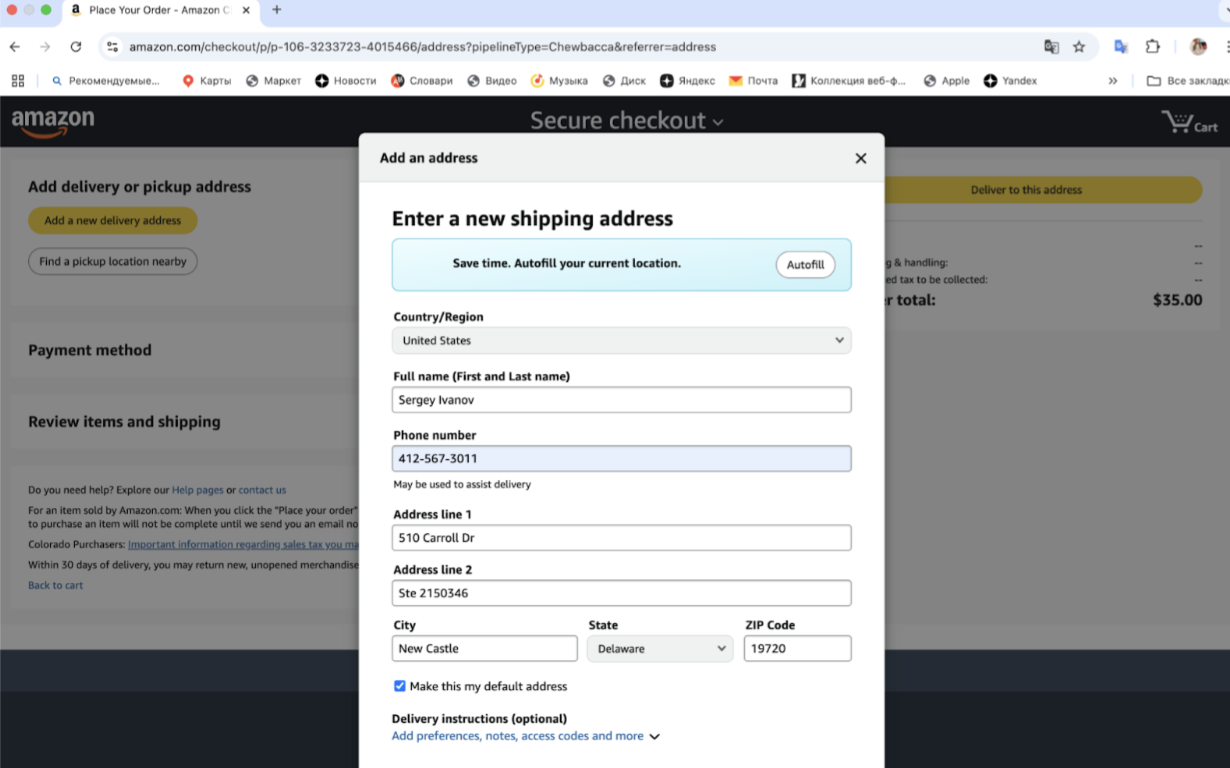
Это тот самый адрес для доставки ваших покупок, который вы получили у нас. Заполняем форму shipping address. Все поля очень важно заполнить правильно и полностью.
Пример заполненных полей адреса:
5. Вы почти закончили! В открывшемся окне осталось только ввести данные вашей иностранной карты.
Вводите номер, имя владельца, период действия и CVC код с обратной стороны карты. Нажмите в конце Add your card.
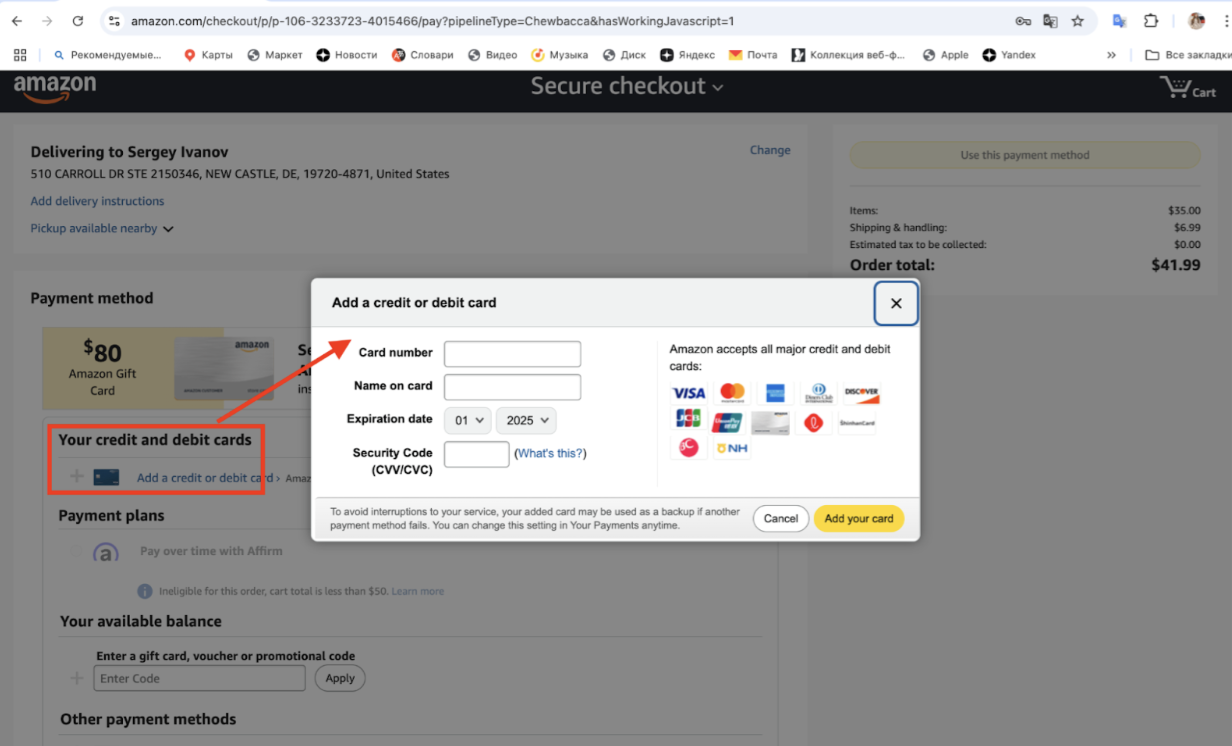
6. После этого нажимаете Use this payment method и все! Готово! Ваш заказ размещен на Амазоне, скоро будет обработан и поступит на наш склад.
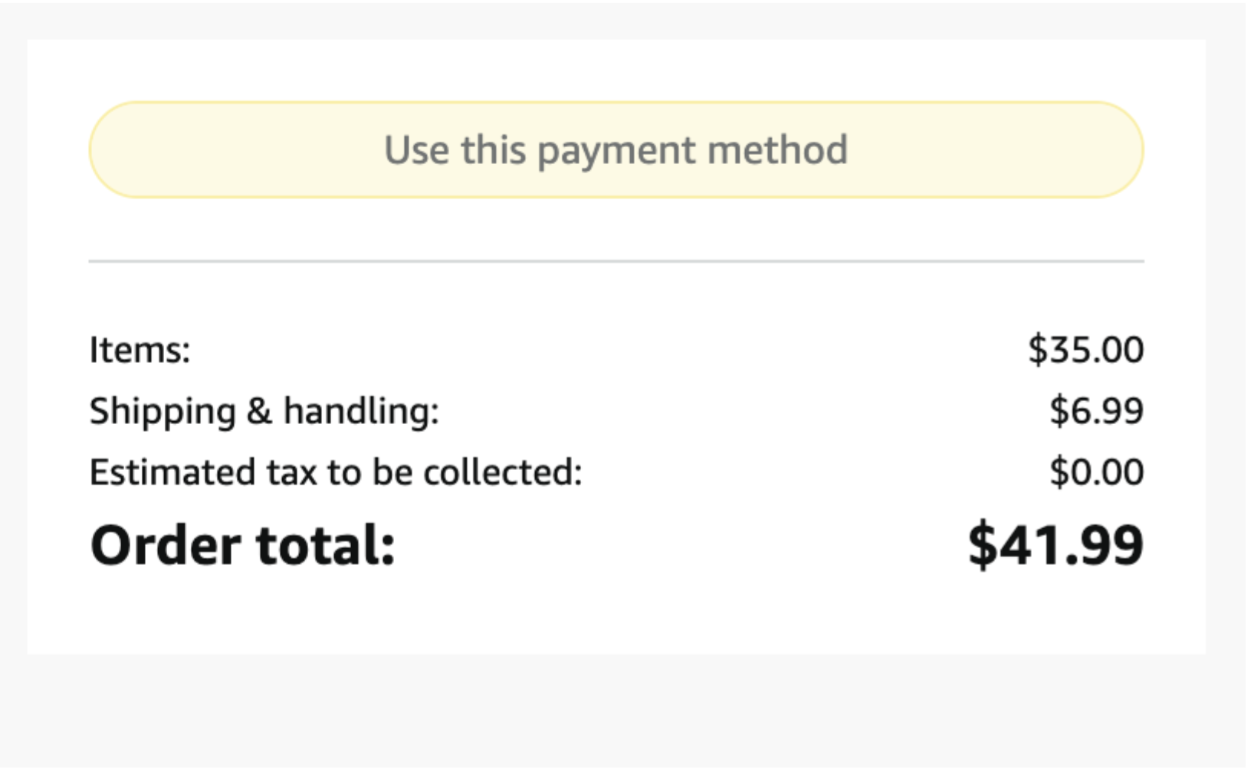
Все передвижения вашего товара вы можете отследить в вашем личном кабинете. Удачного шопинга в Amazon!
Как сделать заказ на Macy’s
-
Перейдите на https://www.macys.com.
-
В правом верхнем углу нажмите Sign In → далее Create Account.
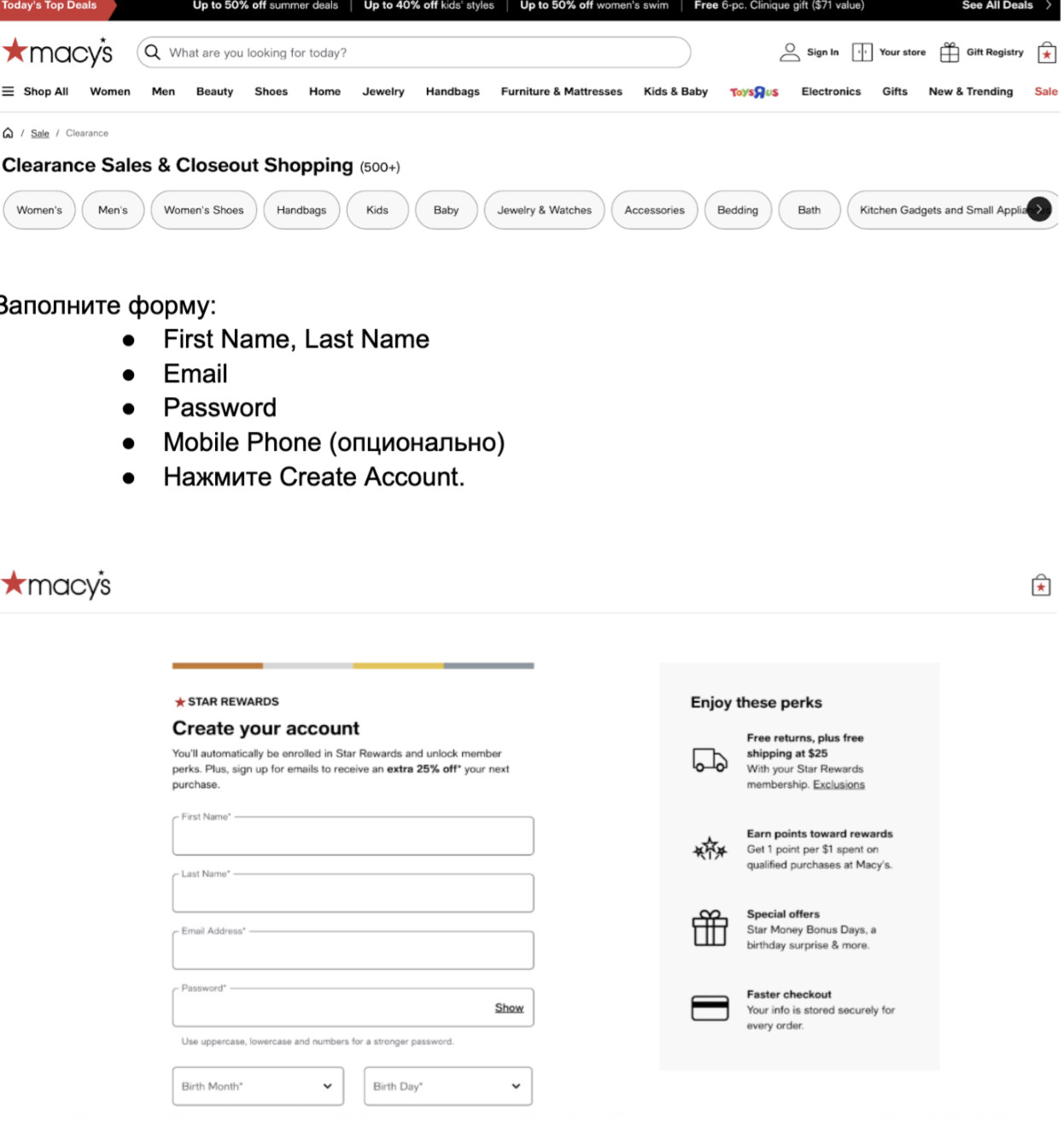
Заполните форму:
-
First Name, Last Name
-
Email
-
Password
-
Mobile Phone (опционально)
-
Нажмите Create Account.
После регистрации вы получите:
-
Удобный доступ к заказам
-
Эксклюзивные скидки
-
Участие в программе Star Rewards (при использовании Macy’s Credit Card)
Выбор товаров
-
В верхнем меню выберите нужный раздел:
Women, Men, Juniors, Kids, Shoes, Handbags, Home и др.
-
Используйте фильтры по бренду, размеру, цвету, цене.
-
На странице товара:
-
Ознакомьтесь с отзывами
-
Выберите нужный размер и цвет
-
Нажмите Add to Bag
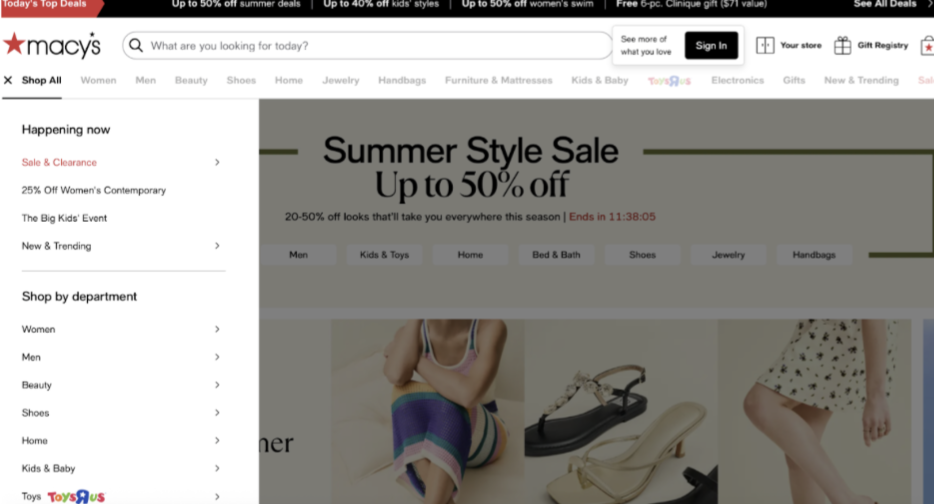
У Macy’s часто действуют промо-коды. Если товар с пометкой "Extra % off with code", не забудьте применить купон на этапе оформления заказа.
Корзина и проверка заказа
-
После выбора товаров нажмите значок корзины в верхнем углу → View Bag & Checkout
-
Убедитесь, что:
-
Цвет и размер указаны верно
-
Товары доступны к доставке
-
Нажмите Checkout
Промокод и купоны
-
Введите промокод в поле Promo Code (если есть).
-
Нажмите Apply — скидка отобразится в корзине.
Macy’s часто публикует коды на главной странице, в слайдерах, или присылает на email.
Оплата
Методы оплаты:
-
Кредитные и дебетовые карты (Visa, Mastercard, Amex)
-
PayPal
-
Macy’s Gift Card
-
Macy’s Credit Card (если есть)
Введите:
-
Номер карты
-
Имя владельца
-
CVV и срок действия
-
Billing address (может совпадать с адресом доставки)
При использовании PayPal откроется отдельное окно для подтверждения, очень важно учитывать, что PayPal можно использовать только если он выпущен за пределами РФ и Беларуси.
Покупки в США с доставкой в Россию и Беларусь – это действительно просто, если понимать основные шаги и заранее учитывать правила доставки. Попробуйте оформить первую посылку и убедитесь, что шопинг в США может быть удобным, понятным и выгодным. А мы вам поможем!